

Real-time streaming
Stream audio and get transcripts in real-time over WebSocket
Real-time streaming
In this quickstart, you create a WebSocket connection to the SubQ Speech-to-Text API and receive transcripts in real-time as audio streams in. At the end, you'll have a working client that sends audio and returns the transcripts.
The API exposes a WebSocket endpoint at wss://stt-api.subq.ai/v1/listen. You send binary audio frames and receive JSON messages containing interim and final transcripts.
Prerequisites
You need a SubQ account. If you don't already have one, create one for free.
Step 1: Get your API key
- Sign in to the SubQ API platform: Go to speech.subq.ai and sign in to your account.
- Navigate to API Keys: While signed in, select API Key on the left sidebar. Your organization's API key is displayed and ready to copy.
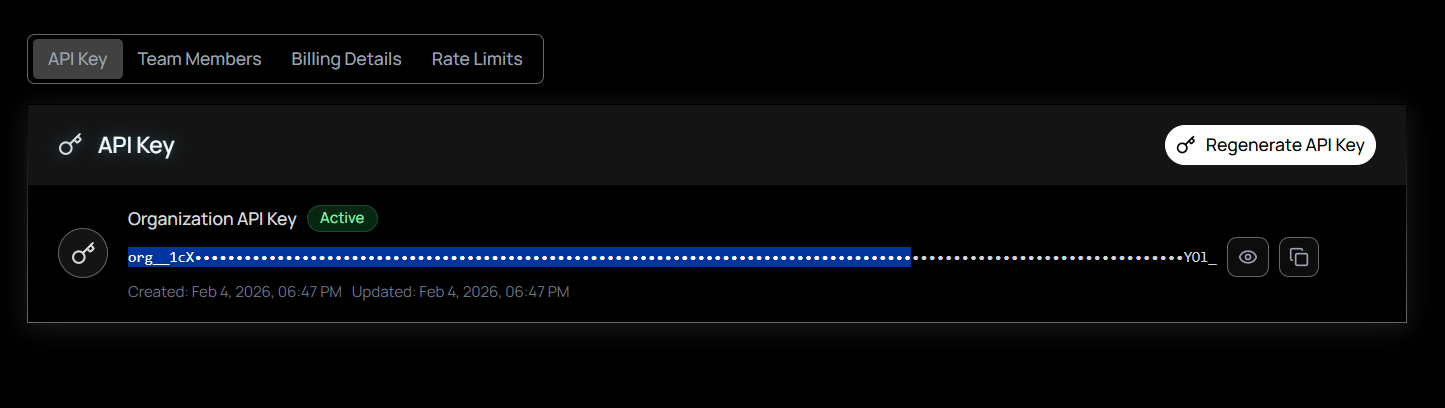
- Copy your key: Select Copy next to your key. If you need a new key, select Regenerate to replace the current one.
Never expose your API key. Store it in an environment variable or secrets manager. Do not hard-code it in client-side code, commit it to version control, or share it in public channels. If you suspect a key has been compromised, regenerate it immediately from your account settings.
Step 2: Connect and stream
Pick your language and run the example. Each one connects to the WebSocket endpoint, streams audio, and prints transcripts as they arrive.
Install the websockets library:
pip install websocketsStream audio from a file and print transcripts as they arrive:
import asyncio
import json
import websockets

API_KEY = "YOUR_SUBQ_API_KEY"
AUDIO_FILE = "audio.wav"
WS_URL = "wss://stt-api.subq.ai/v1/listen?encoding=linear16&sample_rate=16000"

async def stream():
    headers = {"Authorization": f"Bearer {API_KEY}"}

    async with websockets.connect(WS_URL, additional_headers=headers) as ws:

        async def send_audio():
            with open(AUDIO_FILE, "rb") as f:
                while chunk := f.read(4096):
                    await ws.send(chunk)
            await ws.send(json.dumps({"type": "CloseStream"}))

        async def receive_transcripts():
            async for message in ws:
                data = json.loads(message)
                if data.get("type") == "Results" and data.get("is_final"):
                    transcript = data["channel"]["alternatives"][0]["transcript"]
                    if transcript:
                        print(transcript)

        await asyncio.gather(send_audio(), receive_transcripts())

asyncio.run(stream())
Run it:
python stream.pyReplace YOUR_SUBQ_API_KEY with your API key (starts with org_).
This example streams a pre-recorded file over WebSocket for simplicity. In production, you'd stream audio from a microphone or live source. The API behaves the same way: send binary audio frames, receive JSON transcripts.
Install the Deepgram SDK (SubQ is fully compatible):
npm install @deepgram/sdkStream audio and print transcripts:
import { createClient, LiveTranscriptionEvents } from "@deepgram/sdk";
import { createReadStream } from "fs";

const API_KEY = "YOUR_SUBQ_API_KEY";
const AUDIO_FILE = "audio.wav";

const client = createClient({
  key: API_KEY,
  global: { url: "https://stt-api.subq.ai" },
});

const connection = client.listen.live({
  encoding: "linear16",
  sample_rate: 16000,
  interim_results: true,
});

connection.on(LiveTranscriptionEvents.Open, () => {
  console.log("Connected. Streaming audio...");

  const stream = createReadStream(AUDIO_FILE, { highWaterMark: 4096 });
  stream.on("data", (chunk) => connection.send(chunk));
  stream.on("end", () => {
    setTimeout(() => connection.finish(), 1000);
  });
});

connection.on(LiveTranscriptionEvents.Transcript, (data) => {
  const transcript = data?.channel?.alternatives?.[0]?.transcript;
  if (transcript && data.is_final) {
    console.log(transcript);
  }
});

connection.on(LiveTranscriptionEvents.Error, (err) => {
  console.error("Error:", err.message);
});
Run it:
node stream.mjsReplace YOUR_SUBQ_API_KEY with your API key (starts with org_).
This example uses your microphone to capture audio and stream it to SubQ in real-time. Save it as an HTML file and open it in your browser:
<!DOCTYPE html>
<html>
<body>
  <h1>SubQ Live Transcription</h1>
  <button id="start">Start</button>
  <button id="stop" disabled>Stop</button>
  <div id="transcript" style="margin-top: 1rem; white-space: pre-wrap;"></div>

  <script>
    const API_KEY = "YOUR_SUBQ_API_KEY";
    const WS_URL = "wss://stt-api.subq.ai/v1/listen";

    let socket, recorder;

    document.getElementById("start").onclick = async () => {
      const stream = await navigator.mediaDevices.getUserMedia({ audio: true });

      socket = new WebSocket(WS_URL, ["token", API_KEY]);

      socket.onmessage = (event) => {
        const data = JSON.parse(event.data);
        if (data.type === "Results") {
          const text = data.channel.alternatives[0].transcript;
          if (text && data.is_final) {
            document.getElementById("transcript").textContent += text + "\n";
          }
        }
      };

      socket.onopen = () => {
        recorder = new MediaRecorder(stream, { mimeType: "audio/webm" });
        recorder.ondataavailable = (e) => {
          if (e.data.size > 0 && socket.readyState === WebSocket.OPEN) {
            socket.send(e.data);
          }
        };
        recorder.start(250); // Send audio every 250ms
        document.getElementById("start").disabled = true;
        document.getElementById("stop").disabled = false;
      };
    };

    document.getElementById("stop").onclick = () => {
      recorder?.stop();
      socket?.send(JSON.stringify({ type: "CloseStream" }));
      socket?.close();
      document.getElementById("start").disabled = false;
      document.getElementById("stop").disabled = true;
    };
  </script>
</body>
</html>
Open live.html in your browser, click Start, and speak. Transcripts appear in real-time.
Security: Never expose your API key in client-side code in production. Use a backend proxy to authenticate WebSocket connections. This example is for local testing only.
Step 3: Understand the response
Each message from the server is a JSON object. Transcript results look like this:
{
  "type": "Results",
  "channel_index": [0],
  "duration": 1.98,
  "start": 0.0,
  "is_final": true,
  "speech_final": true,
  "channel": {
    "alternatives": [
      {
        "transcript": "Hello world",
        "confidence": 0.95,
        "words": [
          ["Hello", 0, 320],
          ["world", 320, 640]
        ]
      }
    ]
  },
  "metadata": {
    "request_id": "...",
    "model_info": {
      "name": "<model>",
      "version": null,
      "arch": "subq-asr"
    }
  }
}
Key fields
| Field | Meaning |
|---|---|
is_final: false | Interim result. The transcript may change as more audio arrives |
is_final: true | Final result for this audio segment |
speech_final: true | The speaker finished talking (end of utterance) |
confidence | Confidence score (0–1) for the transcript |
words | Array of [word, start_ms, end_ms]. Timestamps are in milliseconds |
Interim results are enabled by default. Set interim_results=false in the query string if you only want final transcripts.
Next steps
You can control endpointing sensitivity, enable PII redaction, set the transcription language, and more by adding query parameters to the WebSocket URL.